Intro
I've been experimenting with AI video generation for a few personal projects, including music videos for my fictional band, Super Tankers. What started as wanting to make a few clips ended up with me building a serverless worker and a studio application to manage the process.
I've got an RTX 5080 in my PC, which is a very capable card, but it has 16 GB of VRAM. For plenty of use cases that's more than enough. For the video generation I wanted to do, though, it became a limitation. There’s only so far you can push things when the model and workflow need more memory than you have available.
I wasn't about to buy another GPU just for this, so I started looking at renting the hardware instead. Runpod gave me a way to experiment with GPUs with considerably more VRAM, without having to own one or keep a server running all the time.
I didn't want another monthly subscription to an AI generation service either. I wanted to pay for what I used, have more control over the workflow, and experiment with models I'd chosen myself, including open-source options.
I also wanted to submit jobs from my own application rather than manually run everything through ComfyUI. The idea was simple enough: send a request, have a worker run the workflow, and get a video back.
As usual, the idea was simpler than getting it all working.
The Goal
The goal was to make video generation something I could call from my own studio application.
ComfyUI would still do the generation, while the application would handle submitting jobs and keeping track of the results. I wanted to organise projects, develop prompts and iterate on clips without manually managing every run.
Serverless made sense for how I was using it. I might generate a batch of videos, then spend time reviewing them, editing or doing something else entirely. I didn't need a GPU server sitting there running throughout that.
I also wanted the option to use larger GPUs and run jobs concurrently. The approach I've settled on is to use my local card for drafts and experimentation, then use remote hardware for the more demanding generations once I'm happy with the direction.
The first milestone was getting one request to work from beginning to end: package the environment, submit the workflow, generate the video and retrieve the result. The studio application and worker now work together, and I've used them to generate coherent sequences for my projects.
Issues Encountered Along the Way
Getting a ComfyUI workflow running locally doesn't automatically mean it will work inside a remote worker.
The graph is only part of it. You also need the models, custom nodes and the right dependencies. Those all need to be available inside the container, with versions that work together. Otherwise, you've got a workflow that looks valid but can't actually execute.
I used a Runpod ComfyUI worker image as the starting point, then worked through getting my video workflow running within it. Having a base image helped, but there was still plenty to configure and debug.
Where to put the models
One decision I changed along the way was where to store the models.
Initially, I tried including them directly in the container image. That seemed straightforward: everything the worker needed would be packaged together. In practice, downloading the models during the build and then having to pull the resulting image became a limitation. These are large files, and it made iterating on the worker slower than I wanted.
I opted to store the models on a Runpod volume instead. That meant they could persist independently of the container, ready to be used whenever a worker needed them. I could rebuild the worker without repeatedly packaging the same model files into the image.
It also meant a change to the worker code didn't need to involve moving all the models around again. That made the setup much more practical while I was still experimenting and fixing things.
Dependencies and optimisations
Some of the friction came from trying to get the software environment into the right state. I experimented with ComfyUI versions and attempted to install SageAttention to improve performance.
That ran into problems around package availability and missing compiler tooling. I ended up falling back to PyTorch attention so I could keep moving.
At that point, getting a working generation mattered more than spending another evening trying to make an optimisation install. Once I had something running, I would have a better basis for deciding where to spend that effort.
It also made the importance of version pinning fairly clear. If a container rebuild pulls in different dependencies, you can end up debugging something that worked previously, even though you haven't changed the workflow.
VRAM and generation time
Moving to a cloud GPU didn't mean I could stop thinking about memory.
My initial experiments included a worker with 32 GB of VRAM. That gave me more room than my local card, but the video outputs I was exploring were still demanding. I started looking at GPUs with considerably more memory, including 96 GB options.
Resolution and clip duration both mattered, alongside the model and workflow settings. I had to work out what was practical rather than assume that renting a bigger GPU would make everything quick.
I eventually started seeing generations around five minutes with a LoRA in the workflow. That's useful as a rough indication of my experience, but it isn't a general benchmark. To make a proper comparison, I'd need to record the GPU, output settings and whether the worker was already warm.
There was also a distinction between the time spent generating and the time spent getting the worker ready. From the application's point of view, both contribute to how long you're waiting for a result.
Waiting for a GPU
One trade-off I've encountered with serverless is that the GPU isn't always available when I want it.
Sometimes the wait for capacity in my selected region has been long. Having the models persisted on a volume helps avoid repeatedly downloading them, but it doesn't remove the wait for hardware to become available.
That matters when I'm trying to iterate on an idea. If every small prompt change involves waiting for a remote worker, it slows the creative process down.
Using my local GPU for drafts makes this more workable. I can experiment locally, work out the direction I want to take, then submit the more demanding versions remotely. The remote generations still need reviewing and sometimes another attempt, but I'm doing more of the initial experimentation without waiting for cloud capacity.
It's a trade-off I'm happy to make for this use case, though it means I can't assume a submitted job will start immediately.
Debugging remote failures
When something failed, the error returned to my application wasn't always enough to explain why.
Some failures included a large amount of workflow information, but I still needed to inspect the worker logs to find the underlying issue. That made debugging more involved than running the graph locally and watching what happened.
It pushed me to think more about what the application should report. If a generation fails, I want enough information to work out whether the problem is with the request, the workflow or the worker environment.
That becomes more important once you start submitting multiple jobs. Manually digging through logs is manageable while experimenting, but it's something I'd like to reduce as the application develops.
Concurrency
Once individual requests were working, I started increasing the maximum number of workers to run more jobs at once.
That helps with completing a batch when capacity is available, but it doesn't make each individual video generate faster. A faster generation and more simultaneous generations are different improvements.
It also means more GPU work can be running at the same time, so I want better visibility into the cost before treating concurrency as something to keep increasing. The useful measure is how much it costs to get a clip I can actually use, including the attempts that don't make it into the final edit.
The End Game and What I Got Out of It
The studio application now exists, and I've used it in combination with the worker to generate meaningful, coherent video sequences for my projects.
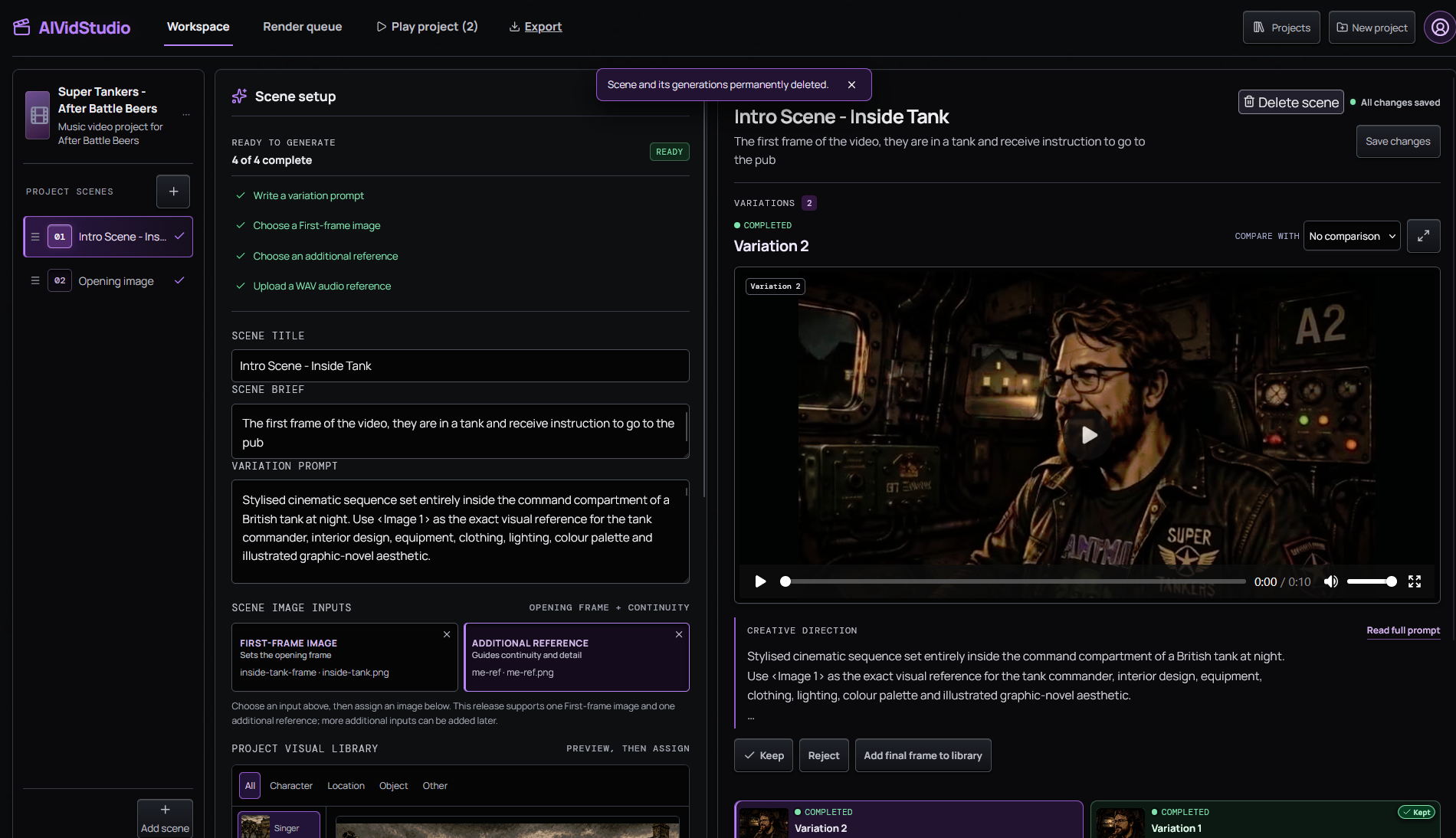
That matters to me because getting individual clips back was only part of the goal. I wanted a process I could use to develop an idea across several shots and produce something that worked as a sequence.
The combination of local drafts and remote generation has made that practical. My RTX 5080 still has a useful role, while the remote workers give me access to the memory needed for the more demanding outputs.
The project also gave me a reason to explore the infrastructure properly. I wanted the videos for something, so successful runs could feed directly into the creative work.
The combination of local drafts and remote generation has made the process practical for me. My RTX 5080 still has a useful role, while the remote workers give me access to the memory needed for the more demanding outputs.
Building this gave me practical experience with packaging an AI workload, debugging it remotely and working through the trade-offs around GPU memory, generation time, availability and concurrency. More importantly, I've used the application and worker together to create coherent sequences for projects I actually wanted to make.
The worker code is available on GitHub, including the handler, Dockerfile and workflow configuration. My first priority was getting the generation process working from beginning to end. Clearer errors, more reproducible builds and better measurements are the next improvements I want to make.
I'll cover the full creative workflow in a separate post, including a closer look at the studio app and how I take an idea through local drafts, remote generation and into a finished sequence.
Comments
Join the discussionNo comments yet. Be the first to comment.